File System Management Service
- Petr Kalina
- Former user (Deleted)
- Former user (Deleted)
- Robin Dube
Description
File System Management Service. Specifies the location of file systems in which DICOM objects received from the Store SCP Server are stored. You can also set up rules to delete the most infrequently accessed studies.
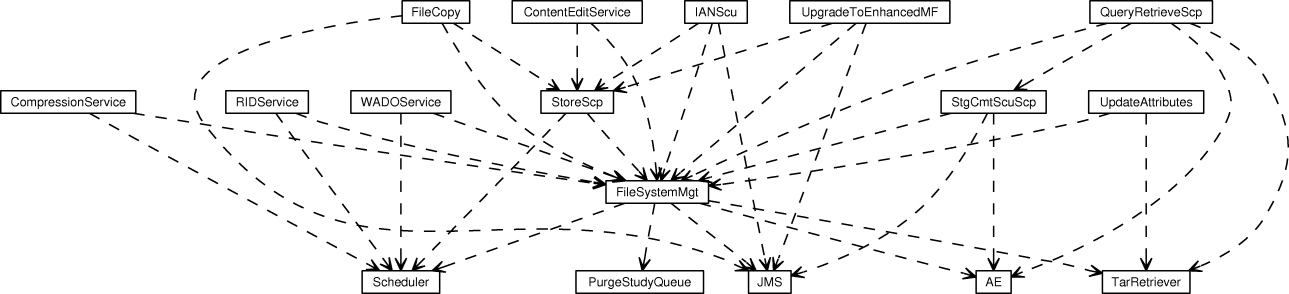
Dependencies
Attributes
#Name
The class name of the MBean
#State
The status of the MBean
#StateString
The status of the MBean in text form
#FileSystemGroupID
Identifier of the file system group managed by this service, specified by property group of its MBean name.
#DefaultRetrieveAETitle
Default Retrieve AE Title, which will be associated with new file systems added by operation #addRWFileSystem.
Default Value: DCM4CHEE
#DefaultAvailability
Default Availability, which will be associated with new file systems added by operation #addRWFileSystem.
Enumerated values: "ONLINE", "NEARLINE","OFFLINE", "UNAVAILABLE".
Default Value: NEARLINE
#DefaultUserInformation
Default User Information, which will be associated with new file systems added by operation #addRWFileSystem.
#DefaultStorageDirectory
Default Storage Directory, used on receive of the first object if no Storage File System was explicit configured byoperation [#addRWFileSystem}. A relative path name is resolved relative to <archive-install-directory>/server/default/.
Use "NONE" to disable auto-configuration to force failure to receive objects, if no Storage File System was explicit configured.
Default Value: NONE
#CheckStorageFileSystemStatus
Flag indicating if the RW status of the current storage file system is checked before each file storage of objects received by the Storage SCP.
If the update of the status of the file system is only performed by invoking operations #updateFileSystemStatus of this service - in particular, if there are no other running dcm4chee applications on other nodes (dcm4chee cluster), and File System records in the database will NOT be updated by executing SQL statements using some dcm4chee external SQL client application - the check can be deactivated to spare the execution of one additional SQL statement for each stored object.
Default Value: true
#MakeStorageDirectory
Create storage directory, if no one exists.
Default Value: false
#MountFailedCheckFile
If the specified file exists, this signals a failed mount.
Default Value: NO_MOUNT
#MinimumFreeDiskSpace
Minimum free disk space. If the free available disk space on the current storage file system falls below this value, the next configured file system becomes the current storage system.
1MB = 1000000 bytes, 1GB = 1000MB.
NONE = disable check for minimal free available disk space.
Default Value: NONE
#FreeDiskSpaceOnCurrentStorageFileSystem
Get free available disk space on the current storage file system in bytes.
#FreeDiskSpaceOnCurrentStorageFileSystemString
Get free available disk space on the current storage file system as string.
#UsableDiskSpaceOnCurrentStorageFileSystem
Get usable free disk space on the current storage file system, considering the configured value for #MinimumFreeDiskSpace, by substracting that value from #FreeDiskSpaceOnCurrentStorageFileSystem, in bytes.
#UsableDiskSpaceOnCurrentStorageFileSystemString
Get usable free disk space on the current storage file system, considering the configured value for #MinimumFreeDiskSpace, by substracting that value from #FreeDiskSpaceOnCurrentStorageFileSystem, as string.
#FreeDiskSpace
Get free available disk space on writable file systems of the file system group managed my this service.
#FreeDiskSpaceString
Get free available disk space on writable file systems of the file system group managed my this service as string.
#UsableDiskSpace
Get usable free disk space on writable file systems of the file system group managed my this service, considering the configured value for #MinimumFreeDiskSpace, in bytes.
#UsableDiskSpaceString
Get usable free disk space on writable file systems of the file system group managed my this service, considering the configured value for #MinimumFreeDiskSpace, as string.
#CheckFreeDiskSpaceMinimalInterval
Minimal Interval for checking free available disk space on current storage file system against minimum value specified by
#MinimumFreeDiskSpace. The current interval (curInterval) is calculated by multiplication of this value (minInterval) with the ratio of the current free available disk space (curFDS) to the configured #MinimumFreeDiskSpace (minFDS), but maximal the value specified by #CheckFreeDiskSpaceMaximalInterval (maxInterval):
curInterval = min(minInterval * curFDS/minFDS, maxInterval)
Format: ##m (in minutes) | ##s (in seconds).
Default Value: 10s
#CheckFreeDiskSpaceMaximalInterval
Maximal Interval for checking free available disk space on current storage file system against minimum value specified by #MinimumFreeDiskSpace. Effective as long the current free available disk space is greater than #MinimumFreeDiskSpace multiplied by the ratio of this value and the configured #CheckFreeDiskSpaceMinimalInterval. Otherwise the interval will be calculated as described above for attribute #CheckFreeDiskSpaceMinimalInterval.
Format: ##m (in minutes) | ##s (in seconds).
Default Value: 60s
#CheckFreeDiskSpaceRetryInterval
Pause check for free available disk space for the specified time interval after no configured file system was found with sufficent (= more than specified by #MinimumFreeDiskSpace) available disk space.
Format: ##m (in minutes) | ##s (in seconds).
Default Value: 60s
#DeleterThresholds
Defines thresholds dependent on hour of day, for deleting the most infrequently accessed studies which satisfy the configured set of constraints.
Format: HOUR:##MB or HOUR:##GB or HOUR:##h
Multiple thresholds with different (start) hour separated by ';'.
NONE = disable deletion of studies on file systems of the file system group managed my this service.
Example: 7:1h;19:24h
=> free space for expected data volume received in 24 hours between 7pm and 7am. Between 7am and 7pm only delete studies if the usable free space falls below the expected data volume received in one hour.
Default Value: NONE
#ExpectedDataVolumePerDay
Expected data volume per day. Used to transform time based deleter thresholds (s. DeleterThresholds) into disk space size to free.
Default Value: 100MB
#AdjustExpectedDataVolumePerDay
Update value of attribute ExpectedDataVolumePerDay at midnight, if data volume received during last 24 hours exceeds its current value.
Default Value: true
#CurrentDeleterThreshold
Get current effective deleter threshold in bytes according configured #DeleterThreshold and #ExpectedDataVolumePerDay. If #UsableDiskSpace falls below this value, most infrequently accessed studies which satisfy the configured set of constraints will be deleted on next invocation of operation #scheduleStudiesForDeletion.
#DeleteStudyIfNotAccessedFor
Defines when a study not accessed for the specified time will be deleted from file systems of the file system group managed by this service, if it satisfies the configured set of constraints.
Format: ##h (in hours) | ##d (in days) | ##w (in weeks) | NEVER
NEVER = deletion of studies is only triggered by running out of disk space.
Example: 52w
=> any studies that have not been accessed for 52 weeks or more can be deleted if they satisfies the configured set of constraints.
Default Value: NEVER
#DeleteStudyOnlyIfNotAccessedFor
Defines minimal time a study must not be accessed before it becomes a candidate for deletion.
Format: ##h (in hours) | ##d (in days) | ##w (in weeks)
Default Value: 1d
#DeleteStudyOnlyIfStorageNotCommited
Defines if no Storage Commitment request must have been accepted for any instances of a study to become a candidate for deletion from file systems of the file system group managed my this service triggered by running out of disk space or being not accessed longer than configured #DeleteStudiesNotAccessedFor. Typically only activated if no other constraint for study deletion is configured.
Default Value: false
#DeleteStudyOnlyIfExternalRetrievable
Defines if all instances of a study must be retrievable from an external Application Entity to become a candidate for deletion from file systems of the file system group managed my this service triggered by running out of disk space or being not accessed longer than configured #DeleteStudiesNotAccessedFor.
Default Value: false
#InstanceAvailabilityOfExternalRetrievable
Defines assumed Instance Availability of only external retrievable Studies.
Enumerated values: ONLINE, NEARLINE, AUTO.
AUTO - query Instance Availability from external Retrieve AE..
Default Value: AUTO
#DeleteStudyOnlyIfCopyOnMedia
Defines if all instances of a study must be stored on Media to become a candidate for deletion from file systems of the file system group managed my this service triggered by running out of disk space or being not accessed longer than configured #DeleteStudiesNotAccessedFor.
Default Value: false
#DeleteStudyOnlyIfCopyOnFileSystemOfFileSystemGroup
Defines if all instances of a study must be stored on a file system of the specified different file system group to become a candidate for deletion from file systems of the file system group managed my this service triggered by running out of disk space or being not accessed longer than configured #DeleteStudiesNotAccessedFor.
"NONE" = no such constraint.
Default Value: NEARLINE_STORAGE
#DeleteStudyOnlyIfCopyArchived
Defines if all instances of a study must be stored on a file system of a different file system group with file status: ARCHIVED to become a candidate for deletion from file systems of the file system group managed my this service triggered by running out of disk space or being not accessed longer than configured #DeleteStudiesNotAccessedFor. Typically the file system group of the file system holding the archived copy is specified by #DeleteStudyIfCopyOnFileSystemOfFileSystemGroup.
Default Value: false
#DeleteStudyOnlyIfCopyOnReadOnlyFileSystem
Defines if all instances of a study must be stored on a read-only file system of a different file system group to become a candidate for deletion from file systems of the file system group managed my this service triggered by running out of disk space or being not accessed longer than configured #DeleteStudiesNotAccessedFor. Typically the file system group of the read-only file systems is specified by #DeleteStudyIfCopyOnFileSystemOfFileSystemGroup.
Default Value: false
#ScheduleStudiesForDeletionOnSeriesStored
Defines if operation #scheduleStudiesForDeletion is invoked to schedule deletion of most infrequently accessed studies after storage of a new Series by the Storage SCP Service.
Default Value: false
#ScheduleStudiesForDeletionInterval
Interval in which operation #scheduleStudiesForDeletion is invoked to schedule deletion of most infrequently accessed studies which satisfies the configured set of constraints from writable file systems of the file system group managed my this service, if they were not accessed longer than configured #DeleteStudiesNotAccessedFor or if #UsableDiskSpace falls below #CurrentDeleterThreshold.
Format: ##s (in seconds), ##m (in minutes), ##h (in hours).
NEVER = do not invoke operation #scheduleStudiesForDeletion by timer thread automatically. => If also #ScheduleStudiesForDeletionOnSeriesStored is not activated, no studies will be deleted automatically from file systems of the file system group managed my this service.
Default Value: NEVER
#ScheduleStudiesForDeletionBatchSize
Defines maximal number of studies scheduled for deletion in one transaction.
Default Value: 100
#DeleteOrphanedPrivateFilesInterval
Interval in which operation #deleteOrphanedPrivateFiles is invoked to delete orphaned private files from writable file systems of the file system group managed my this service. Orphaned private files are the result of deleting instances from the web trash folder.
Format: ##s (in seconds), ##m (in minutes), ##h (in hours).
NEVER = do not invoke operation #deleteOrphanedPrivateFiles automatically => never delete orphaned private files from the file system group managed my this service automatically.
Default Value: NEVER
#DeleteOrphanedPrivateFilesBatchSize
Limit the number of orphaned private files that are deleted by one invocation of operation <i>deleteOrphanedPrivateFiles</i>.
Default Value: 1000
#UpdateStudiesBatchSize
Defines maximal number of studies fetched from the data base in one transaction by operation #updateFileSystemAvailability and #updateFileSystemRetrieveAETitle for update of Availability and RetrieveAETs values in Study, Series and Instance records.
Default Value: 1000
#TimerIDScheduleStudiesForDeletion
Used internally. Do NOT modify.
#TimerIDDeleteOrphanedPrivateFiles
Used internally. Do NOT modify.
#SchedulerServiceName
Used internally. Do NOT modify.
#DeleteStudyServiceName
Used internally. Do NOT modify.
#StoreScpServiceName
Used internally. Do NOT modify.
Operations
#create
Standard MBean lifecycle method
#start
The start lifecycle operation
#stop
The stop lifecycle operation
#destroy
The destroy lifecycle operation
#jbossInternalLifecycle
The detyped lifecycle operation (for internal use only)
#listAllFileSystems
List all configured file systems.
#listFileSystems
List all configured file systems associated with the file system group managed my this service.
#listFileSystemDirectories
Return Directory Paths for all configured file systems associated with the file system group managed my this service as array of Files.
#addRWFileSystem
Add RW file system to the file system group managed my this service. The file system is also linked to existing other file systems of the group.
#removeFileSystem
Remove empty file system from the file system group managed my this service. Will fail, if there are already/still file records associated with the file system.
#linkFileSystems
Link or unlink two file systems of the file system group managed my this service.
#updateFileSystemStatus
Update RW status of the specified file system. If the new file system status is "RW+", which defines the file system as current storage file system, the status of the previous storage file system is set to "RW", to ensure that there is only one file system in one file system group with status "RW+".
#updateFileSystemAvailability
Update file system availability of the specified file system.
#updateFileSystemRetrieveAETitle
Update Retrieve AE Title associated to the specified file system.
#selectStorageFileSystem
Select Storage File System
#selectStorageDirectory
Select Storage File System and return Directory
#adjustExpectedDataVolumePerDay
Update value of attribute #ExpectedDataVolumePerDay, if data volume received during last 24 hours exceeds its current value.
#scheduleStudiesForDeletion
Schedules deletion of most infrequently accessed studies which satisfies the configured set of constraints from writable file systems of the file system group managed my this service, if they were not accessed longer than configured #DeleteStudiesNotAccessedFor or if #UsableDiskSpace falls below #CurrentDeleterThreshold. Returns the number of studies scheduled for deletion.
#scheduleStudyForDeletion
Schedule deletion of study with specified Study Instance UID from writable file systems of the file system group managed by this service, without consideration of the configured set of constraints. Returns size of study in bytes scheduled for deletion.
#deleteOrphanedPrivateFiles
Delete orphaned private files from writable file systems of the file system group managed my this service. Orphaned file system.
#selectStorageFileSystem
Select Storage File System
#selectStorageDirectory
Select Storage File System and return Directory
#adjustExpectedDataVolumePerDay
Update value of attribute #ExpectedDataVolumePerDay, if data volume received during last 24 hours exceeds its current value.
#scheduleStudiesForDeletion
Schedules deletion of most infrequently accessed studies which satisfies the configured set of constraints from writable file systems of the file system group managed my this service, if they were not accessed longer than configured #DeleteStudiesNotAccessedFor or if #UsableDiskSpace falls below #CurrentDeleterThreshold.
Returns the number of studies scheduled for deletion.
#scheduleStudyForDeletion
Schedule deletion of study with specified Study Instance UID from writable file systems of the file system group managed by this service, without consideration of the configured set of constraints. Returns size of study in bytes scheduled for deletion.
#deleteOrphanedPrivateFiles
Delete orphaned private files from writable file systems of the file system group managed my this service. Orphaned private files are the result of deleting instances from the web trash folder. Returns the number of deleted files.